Gaming on the PS5 delivers incredible experiences. However, your communication quality matters just as much as your gameplay. The right microphone accessories can transform your voice chat from mediocre to professional. This guide explores the best accessories that enhance your PS5 gaming microphone setup.
Why Microphone Accessories Matter for PS5 Gaming
Clear communication gives you a competitive edge in team-based games. Your teammates need to hear callouts, strategies, and warnings without strain. Additionally, streaming and content creation require professional audio quality to attract and retain viewers.
Standard microphones often pick up unwanted noise from your environment. Background sounds, keyboard clicks, and controller vibrations can distract your team. Therefore, investing in quality accessories improves your overall gaming experience.
According to TechRadar, the PS5’s audio capabilities are advanced, making it crucial to pair the console with quality audio equipment for the best experience.
Pop Filters and Windscreens
Pop filters are essential accessories for any gaming microphone. These screens sit between your mouth and the microphone. They catch harsh plosive sounds that occur when you say words with P, B, or T sounds.
Without a pop filter, these sounds create unpleasant popping noises in your audio. Your teammates will appreciate the cleaner sound quality. Moreover, pop filters are affordable and easy to install.
Windscreens serve a similar purpose but use foam material. They slip directly over your microphone capsule. Windscreens reduce wind noise and breathing sounds effectively. Many USB microphones include a basic foam windscreen in the package.
Choose between pop filters and windscreens based on your microphone type. Dynamic microphones work well with foam windscreens. Condenser microphones benefit more from traditional pop filters positioned a few inches away.
Boom Arms and Microphone Stands
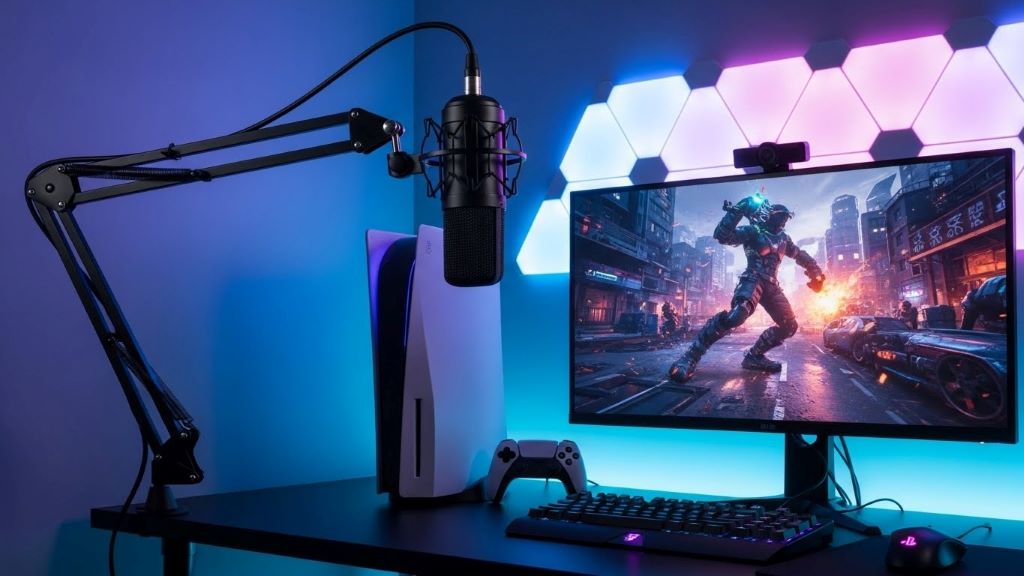
Boom arms revolutionize your gaming setup by positioning your microphone optimally. These adjustable arms attach to your desk and extend toward your mouth. You can adjust the height, angle, and distance easily.
Desktop space becomes precious when you have multiple monitors, controllers, and peripherals. A boom arm lifts your microphone off the desk completely. This frees up valuable space for other gaming essentials.
Furthermore, boom arms reduce vibration transfer from your desk. Keyboard typing and mouse movements create vibrations that travel through surfaces. These vibrations reach microphones sitting on the desk. A boom arm isolates your microphone from these disturbances.
Look for boom arms with internal cable management. These designs keep your setup looking clean and professional. Additionally, ensure the arm supports your microphone’s weight comfortably. Most gaming microphones weigh between 300 and 600 grams.
Desktop stands offer a more budget-friendly alternative. Adjustable desktop stands provide flexibility without permanent desk mounting. They work well if you move your setup frequently or share your gaming space.
Shock Mounts for Vibration Isolation
Shock mounts suspend your microphone using elastic bands or springs. This suspension system absorbs vibrations before they reach the microphone. The result is significantly cleaner audio with less handling noise.
Gaming involves constant movement. You lean forward during intense moments, adjust your position, and sometimes hit your desk in frustration. All these actions create vibrations. Shock mounts prevent these disturbances from ruining your audio.
Most shock mounts use a cradle design with elastic suspension cords. The microphone sits securely in the cradle while the elastic bands absorb movement. This simple mechanical system works remarkably well.
Compatibility is crucial when choosing a shock mount. Check your microphone’s diameter and thread size. Standard sizes include small diaphragm microphones at 23-25mm and large diaphragm microphones at 48-58mm. Additionally, verify the thread mount matches your microphone stand or boom arm.
XLR Cables and Audio Interfaces
Many professional microphones use XLR connections instead of USB. XLR cables provide superior audio quality and greater flexibility. However, the PS5 doesn’t have direct XLR inputs. Therefore, you need an audio interface to bridge this gap.
Audio interfaces connect to your PS5 via USB. They convert the analog XLR signal to digital audio the console understands. These devices also provide features like gain control, phantom power, and direct monitoring.
Quality XLR cables matter more than many gamers realize. Cheap cables introduce noise and interference into your signal. Investing in well-shielded cables maintains your audio clarity. Look for cables with gold-plated connectors and braided shielding.
Cable length affects your setup flexibility. Three-meter cables work well for most gaming stations. Longer cables provide more positioning options but can introduce signal degradation. Balance your needs against potential quality loss.
Audio interfaces range from simple single-channel devices to complex multi-input units. For PS5 gaming, a basic two-channel interface provides everything you need. Popular options include the Focusrite Scarlett Solo and PreSonus AudioBox.

Acoustic Treatment Panels
Your gaming room’s acoustics significantly impact your microphone’s sound quality. Hard surfaces like walls, desks, and windows reflect sound waves. These reflections create echo and reverb in your recordings.
Acoustic foam panels absorb these reflections before they reach your microphone. Strategic placement of panels behind and beside your microphone position works wonders. You don’t need to cover every wall to see improvements.
Acoustic panels come in various thicknesses and densities. Thicker panels absorb lower frequencies more effectively. For gaming voice chat, two-inch thick panels provide adequate treatment. Additionally, panels with wedge or pyramid patterns offer better performance than flat panels.
Installation is straightforward using adhesive strips or mounting putty. Position panels at reflection points where sound bounces toward your microphone. According to Forbes, proper acoustic treatment improves audio quality significantly in any space.
Start with a few panels and add more as needed. You can always expand your acoustic treatment over time. However, avoid over-treating your space, which can make your voice sound unnaturally dead.
Headphone Amplifiers for Monitoring
Monitoring your own voice while gaming helps you maintain consistent volume levels. Headphone amplifiers boost your monitoring signal and provide better control. This becomes especially important during long gaming sessions.
Many audio interfaces include headphone amplification. However, dedicated headphone amps offer superior quality and more power. They drive high-impedance headphones more effectively than basic interface outputs.
Look for amplifiers with independent volume controls for different sources. You want to balance game audio, voice chat, and your own microphone monitoring separately. This flexibility prevents voice chat from drowning out important game sounds.
Some amplifiers include features like bass boost and virtual surround sound. These enhancements can improve your gaming immersion. Nevertheless, prioritize clean amplification over flashy features for the best results.
Cable Management Solutions
A clean setup looks professional and functions better. Cable management accessories keep your microphone cables organized and protected. Tangled cables create frustration and can damage connectors over time.
Velcro cable ties offer reusable and adjustable organization. They secure cables without the permanent commitment of zip ties. Use them to bundle cables together and attach them to your desk or boom arm.
Cable clips attach to surfaces and guide cables along their path. They prevent cables from sagging or pulling on connections. Additionally, clips keep cables away from moving parts like your chair wheels.
Cable sleeves provide ultimate protection and aesthetics. These fabric tubes enclose multiple cables in one neat bundle. They hide messy cables completely while allowing easy access when needed.
Consider colored cables or cable labels for easy identification. When troubleshooting issues, quickly identifying the correct cable saves time. This becomes valuable during streaming or competitive gaming when every second counts.
Microphone Preamps for Enhanced Quality
Preamps boost your microphone’s signal before it reaches your interface or console. This amplification adds clarity and reduces noise in your audio chain. Quality preamps can transform a decent microphone into an excellent one.
Some microphones have low output levels that need significant gain. Adding too much gain at the interface level introduces noise. A dedicated preamp provides clean amplification before the signal reaches your interface.
Tube preamps add warmth and character to your voice. They use vacuum tubes to amplify the signal, creating a pleasant harmonic distortion. This coloration can make your voice sound fuller and more professional.
Solid-state preamps offer transparent amplification without coloration. They reproduce your voice accurately without adding character. Choose based on your personal preference and the sound you want to achieve.
Remember that preamps add complexity to your setup. They require additional power, space, and connections. Evaluate whether the improvement justifies the added investment and setup complexity.
Maintenance and Care Accessories
Protecting your microphone investment requires proper maintenance. Simple accessories extend your equipment’s lifespan and maintain performance quality. Regular cleaning prevents dust buildup that degrades audio quality.
Microphone cleaning kits include specialized brushes and cleaning solutions. These tools safely remove dust and debris without damaging sensitive components. Use them monthly or whenever you notice reduced clarity.
Dust covers protect your microphone when not in use. These fabric or plastic covers prevent dust accumulation between gaming sessions. They’re especially important if your gaming area has pets or gets dusty quickly.
Carrying cases protect microphones during transport or storage. Padded cases absorb impacts and prevent physical damage. If you attend LAN parties or travel with your setup, a quality case is essential.
Desiccant packets control moisture in storage cases. Humidity can damage electronic components and encourage mold growth on foam accessories. Place packets in your storage areas to maintain optimal conditions.
Budget-Friendly Starter Accessories
Starting with microphone accessories doesn’t require a massive investment. Several affordable options deliver impressive improvements. Begin with essentials and expand your collection gradually.
A basic pop filter and desktop stand cost under thirty dollars combined. This combination immediately improves your audio quality noticeably. You can add more advanced accessories as your budget allows.
DIY solutions work surprisingly well for some accessories. Homemade acoustic panels using moving blankets or towels provide temporary treatment. While not as effective as commercial panels, they demonstrate the concept before you invest.
Watch for bundle deals that include multiple accessories. Many retailers offer starter packages with compatible items at discounted prices. These bundles ensure everything works together and often cost less than buying items separately.
Advanced Accessories for Serious Gamers
Experienced gamers and content creators benefit from premium accessories. These advanced tools provide professional-grade results. However, they require larger investments and more setup knowledge.
Digital signal processors offer real-time audio enhancement. They add effects like compression, equalization, and noise gating. These processors shape your voice to sound more professional and broadcast-ready.
Wireless microphone systems eliminate cable constraints entirely. You can move freely without worrying about cable length. However, wireless systems introduce potential interference and latency issues.
Multiple microphone setups allow for co-op streaming or podcasting. Mixer boards manage several microphone inputs simultaneously. This setup requires significant space and technical knowledge to implement properly.
Choosing the Right Accessories for Your Setup
Assess your current setup before buying accessories. Identify your biggest audio problems first. Address those issues with targeted accessory purchases rather than buying everything at once.
Consider your gaming style and communication needs. Competitive gamers prioritize clarity and noise reduction. Streamers focus on broadcast quality and aesthetics. Choose accessories that align with your specific goals.
Research compatibility with your existing equipment. Not all accessories work with every microphone or console setup. Read reviews from other PS5 gamers to learn about compatibility issues.
Start with one or two essential accessories. Test them thoroughly before adding more. This approach lets you understand each accessory’s impact on your audio quality.
Conclusion
Investing in quality microphone accessories dramatically improves your PS5 gaming communication. Pop filters and windscreens eliminate harsh sounds, while boom arms and shock mounts reduce unwanted vibrations. XLR cables and audio interfaces unlock professional microphone options, and acoustic treatment panels control room reflections. Starting with essential accessories and gradually expanding your collection provides the best value. Whether you’re a competitive gamer or content creator, the right accessories transform your voice chat from basic to broadcast quality. Choose accessories that address your specific needs and watch your gaming communication reach new levels of clarity and professionalism.
Frequently Asked Questions
What microphone accessories are essential for PS5 gaming?
The most essential accessories include a pop filter or windscreen, a boom arm or desktop stand, and quality cables. These basics significantly improve your audio quality without breaking the bank. Add shock mounts and acoustic treatment as your budget allows for further improvements.
Do I need an audio interface for my PS5 microphone?
You only need an audio interface if using XLR microphones. USB microphones connect directly to the PS5 without additional equipment. However, audio interfaces provide better control over your audio and unlock higher-quality microphone options for serious gamers.
How do boom arms improve gaming microphone quality?
Boom arms position your microphone optimally and reduce desk vibration transfer. They free up desk space and allow precise positioning for best audio capture. Additionally, boom arms with internal cable management keep your setup looking clean and professional.
Are expensive XLR cables worth it for PS5 gaming?
Quality XLR cables reduce interference and maintain signal integrity better than cheap alternatives. However, you don’t need the most expensive options. Mid-range cables with good shielding and quality connectors provide excellent results for gaming applications.
Can acoustic treatment panels really improve my gaming microphone sound?
Yes, acoustic panels significantly reduce room echo and reflections. This creates cleaner, more professional-sounding audio for voice chat and streaming. Strategic placement of just a few panels makes noticeable improvements without requiring full room treatment.
Related Topics:
Resetting Nintendo Switch – An Easy Guide