Getting the most out of NBA 2K26 on PC comes down to one thing: the right graphics settings. The game looks stunning, but it is not the most optimized title on the market. Without proper tuning, even a powerful GPU can struggle with frame drops, stutters, and input lag. Fortunately, a few smart adjustments can transform your experience completely.
This guide covers the best settings for both Nvidia RTX and AMD Radeon GPUs across all major resolutions. Whether you play at 1080p, 1440p, or 4K, you will find clear and practical advice here.
NBA 2K26 PC System Requirements: What You Need to Play
Before diving into settings, it helps to understand what the game actually demands from your hardware. The official system requirements give you a solid baseline.
| Spec Category | Minimum Requirements | Recommended Requirements |
| GPU | Nvidia GTX 1060 or AMD RX 5500 XT | Nvidia RTX 2070 or AMD RX 5700 |
| CPU | Intel Core i3-9100 or AMD Ryzen 3 1200 | Intel Core i5-10600 or AMD Ryzen 5 3600X |
| RAM | 8 GB | 16 GB |
| Storage | 110 GB SSD | 110 GB SSD |
| OS | Windows 10 64-bit | Windows 10/11 64-bit |
| API | DirectX 12 | DirectX 12 |
An SSD is not optional — it is required. Installing the game on a hard drive results in long loading times and erratic in-game performance. Additionally, your GPU must support DirectX feature level 12.0 to run the game at all.
Why NBA 2K26 Needs Manual Optimization
NBA 2K26 uses the ProPLAY Motion engine, which relies on machine learning and real NBA footage to deliver lifelike player animations. This makes the game look incredible. However, the default graphics settings are rarely optimized for stable performance. Many players load the game at default high or ultra settings and immediately notice frame drops, especially in areas like My Park.
Therefore, manual tuning is essential. The goal is a stable 60 frames per second or higher, with input latency kept as low as possible. In a basketball game, input timing directly affects gameplay. Smoother performance means more consistent shot timing and better overall play.
Understanding Upscaling: DLSS, FSR, and XeSS
NBA 2K26 supports three major upscaling technologies. Each works differently, and choosing the right one for your GPU matters a great deal.
| Upscaling Tech | Best For | Image Quality | Performance Gain |
| DLSS 4 | Nvidia RTX 40 and 50 series | Excellent | High |
| FSR 4 | AMD RDNA 4 series (RX 9000) | Good | Very High |
| FSR 3 | Older AMD and any GPU | Decent | High |
| XeSS | AMD RX 7000+ and Intel Arc | Very Good | Moderate |
RTX users get the best deal here. DLSS 4 uses a transformer-based model that produces sharp, clean images with minimal ghosting. It also reduces VRAM usage compared to older versions. For AMD users on the RX 9000 series, FSR 4 is a significant step up from FSR 3 and delivers strong results at 1440p. XeSS is a solid middle-ground option that has received AI-based upgrades, though it does carry a small performance penalty.
Best Settings for Nvidia RTX GPUs
RTX 30 Series (RTX 3060, 3070, 3080)
The RTX 30 series can still run NBA 2K26 well, but VRAM is a concern. Cards with only 8 GB of VRAM, such as the RTX 3070, can hit their limits at 1440p with high textures enabled. Therefore, keeping texture settings to medium at 1440p helps prevent stuttering.
My Park is one of the most demanding zones in the game. Frame rates regularly drop there, even on capable hardware. Keep settings conservative if you play that mode often.
| Setting | Recommended Value |
| Resolution | 1080p or 1440p |
| Upscaling | DLSS Quality |
| Texture Detail | Medium to High |
| Shadow Detail | Medium |
| Player Detail | Medium |
| Crowd Detail | Medium |
| Ambient Occlusion | On |
| Volumetric Lighting | On |
| Ray Tracing | Off (RTX 3060/3070), Optional (RTX 3080) |
| V-Sync | Off |
RTX 40 Series (RTX 4070, 4080, 4090)
RTX 40 series owners have much more headroom. The RTX 4070 Super and above handle 1440p at native resolution without issue. The RTX 4080 and 4090 can push 4K with DLSS Quality enabled.
Ray tracing is optional on the RTX 4070. However, only enable it if your base frame rate stays above 60 FPS before turning it on. RTX 4080 and 4090 users can leave ray tracing on at all times without worry.
| Setting | RTX 4070 | RTX 4080 / 4090 |
| Resolution | 1440p | 4K |
| Upscaling | DLSS Quality | DLSS Quality |
| Texture Detail | High | Ultra |
| Shadow Detail | High | High |
| Player Detail | High | High |
| Crowd Detail | High | High |
| Ray Tracing | Optional | On |
| V-Sync | Off | Off |
RTX 50 Series (RTX 5060, 5070, 5080, 5090)
The RTX 50 series is where NBA 2K26 becomes effortless. DLSS 4 Multi Frame Generation is available on these cards. This technology generates up to three additional frames per rendered frame, which dramatically boosts perceived smoothness. Even the entry-level RTX 5050 runs the game comfortably.
The RTX 5060 Ti and above can enable ray-traced reflections. At 1440p, the RTX 5070 delivers native quality gaming without needing aggressive upscaling. Additionally, if you own the 8 GB version of the RTX 5060 Ti, monitor your VRAM usage at 1440p before pushing to ultra textures.
Best Settings for AMD Radeon GPUs
RX 7000 Series (RX 7600, 7700 XT, 7900 XTX)
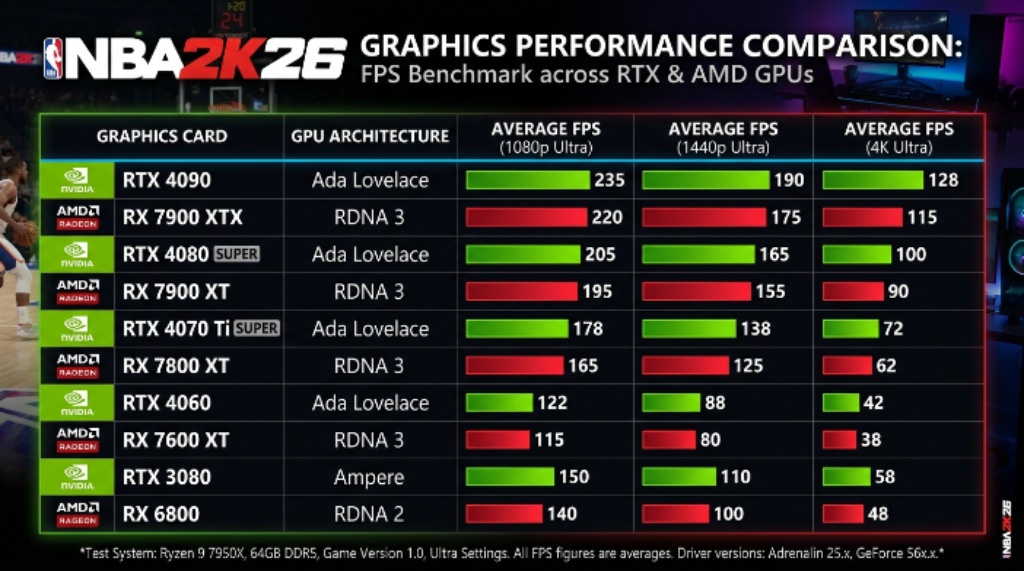
The RX 7600 and 7600 XT are best suited for 1080p gaming. Their 8 GB of VRAM can become a limitation at 1440p, so reducing texture and shadow quality helps maintain smooth performance. The RX 7900 XTX, however, is a 4K-capable card and handles the game with confidence.
For upscaling, AMD users on the 7000 series can choose between FSR 3 and XeSS. FSR delivers higher frame rates, while XeSS offers better image quality. The choice depends on your priorities.
| Setting | RX 7600 / 7700 XT | RX 7900 XT / XTX |
| Resolution | 1080p / 1440p | 1440p / 4K |
| Upscaling | FSR 3 Quality | XeSS or FSR Quality |
| Texture Detail | Medium | High |
| Shadow Detail | Low to Medium | High |
| Player Detail | Medium | High |
| Crowd Detail | Medium | High |
| Ray Tracing | Off | Optional |
| V-Sync | Off | Off |
RX 9000 Series (RX 9060 XT, 9070, 9070 XT)
AMD’s latest RDNA 4 cards bring meaningful improvements to NBA 2K26. The RX 9060 XT runs the game at 1080p and 1440p with frame rates between 80 and 144 FPS depending on settings. FSR 4, available on RDNA 4 hardware, is a substantial upgrade. It uses improved image reconstruction and handles fast-moving basketball action cleanly.
At 1440p with FSR 4 Quality mode enabled, the RX 9060 XT can maintain over 90 FPS on High settings even with ray tracing turned on. At 4K, expect 40 to 60 FPS on Medium settings without upscaling. Enable FSR 4 at 4K to push that number higher.
The RX 9070 and RX 9070 XT are well suited for 4K gaming. With optimized settings and FSR 4, they maintain 60 FPS or above consistently.
Key Settings to Prioritize Across All GPUs
Some settings have a much bigger impact on performance than others. Knowing which ones to adjust first saves time and delivers the biggest gains.
- Crowd Detail: This is one of the heaviest settings in the game. Reducing it from High to Medium frees up significant GPU resources without changing how players look on court.
- Shadow Detail: Shadows are expensive to render. Dropping from High to Medium or Low has a noticeable impact on frame rates, especially in large outdoor zones.
- Texture Detail: Keep this as high as your VRAM allows. Texture quality has a strong effect on visual fidelity but depends heavily on available memory.
- Ray Tracing: Only enable this if your GPU has enough headroom. Turn it off first if you are chasing higher frame rates.
- V-Sync: Turn this off. It adds input lag, which hurts your reaction time in gameplay. Use an in-game frame cap instead if screen tearing is visible.
Additionally, reducing render scale or enabling upscaling before cutting textures is the smarter approach. Upscaling recovers frames while keeping the game looking sharp.
General Performance Tips for US Gamers
Beyond in-game settings, a few system-level habits improve performance across the board.
- Keep your GPU drivers updated. Both Nvidia and AMD regularly release game-ready drivers that include performance patches.
- Set your power plan to High Performance in Windows. This prevents your CPU from throttling during intensive game sessions.
- Close background apps before launching the game. Browsers, streaming apps, and Discord all consume RAM and CPU cycles.
- Run the game from an SSD, not a hard drive. The game requires an SSD, and performance degrades noticeably without one.
- If you experience stutters in My Park or online modes, reduce crowd detail and lighting quality first before adjusting anything else.
Conclusion
NBA 2K26 rewards players who take the time to tune their graphics settings properly. The game performs well on modern hardware, but the default settings rarely deliver a stable and competitive experience out of the box. RTX users benefit from DLSS 4, which provides the best image quality and frame rate gains across all resolutions. AMD users on the newer RDNA 4 cards enjoy FSR 4, a major step forward in upscaling quality. Older GPU owners on either platform can still enjoy smooth gameplay by prioritizing crowd detail, shadow reduction, and smart upscaling choices. With the right settings dialed in, NBA 2K26 runs smoothly, looks great, and plays the way it should.
Frequently Asked Questions
What GPU does NBA 2K26 recommend for PC?
The officially recommended GPU is the Nvidia GeForce RTX 2070 or the AMD Radeon RX 5700. These cards target a solid experience at 1080p and 1440p with standard settings. However, newer GPUs from the RTX 40, RTX 50, and AMD RX 9000 series deliver significantly better performance and upscaling support.
Does NBA 2K26 support DLSS and FSR?
Yes. The game supports DLSS 4 for Nvidia RTX users and FSR 4 for AMD RX 9000 series users. Older AMD cards and Nvidia cards outside the RTX range can use FSR 3 or XeSS. DLSS 4 currently offers the best image quality and performance gains overall.
Why does my frame rate drop in My Park on NBA 2K26?
My Park is one of the most graphically intensive zones in the game. Crowd simulation and dynamic lighting hit performance hard in this area. Reducing crowd detail, shadow quality, and ambient occlusion specifically for this mode helps maintain stable frame rates.
Is 16 GB of RAM enough for NBA 2K26 on PC?
Yes. 16 GB of RAM meets the recommended system requirements and is more than sufficient for smooth gameplay. Some users with 8 GB of RAM may experience stuttering or longer loading times, especially when running background applications simultaneously.
Should I enable ray tracing in NBA 2K26?
It depends on your GPU. RTX 4080, RTX 4090, RTX 5070, and RX 9070 XT users can enable ray tracing without a major performance penalty. For mid-range cards like the RTX 4070 or RX 9060 XT, enable it only if your base frame rate is above 60 FPS. On older or entry-level cards, leaving ray tracing off is the better choice for competitive play.