
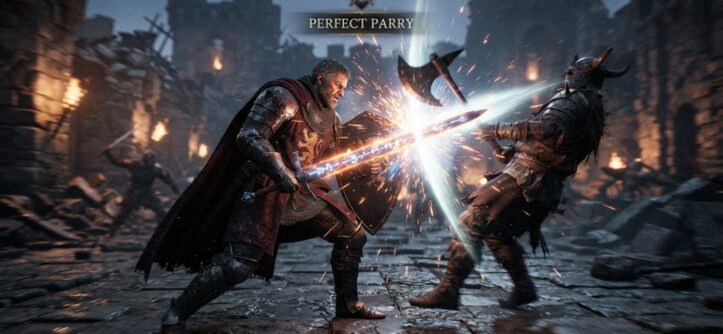
Fast action combat punishes hesitation. To never miss a hit, you need three things: sharp timing, predictable enemy patterns, and muscle memory built through repetition. This guide breaks down exactly how to get there.
Most players miss hits because they react too late or move too early. Both mistakes come from the same root problem: poor read timing. Once you fix your timing, your accuracy jumps almost overnight.
This article covers the real mechanics behind fast combat systems. You’ll learn how to read animations, adjust your reflexes, and build habits that stick even under pressure.
Why You’re Missing Hits in Fast Combat Games
You miss hits because your input timing doesn’t match the game’s hit windows. Every fast combat game runs on frame data, even if it doesn’t show you the numbers. Attacks have a wind-up, an active hit frame, and a recovery period.
Most new players swing during the wind-up. They see an opening and panic-attack too soon. The enemy dodges, and the recovery frames leave you exposed. Veterans wait one beat longer. They strike right as the active frame appears.
Lag also plays a role. Online games add input delay on top of animation timing. If you play on a poor connection, your hits will feel late even when your reflexes are fine. Test your connection quality before blaming your skills.
Predictive Combat: Reading Enemy Animations Before the Strike
Mastering combat timing relies entirely on reading body language rather than static positioning; every threat visually broadcasts its intent long before the hit frame connects. Whether it is a subtle shoulder wind-up, a sword drawing backward, or a boss raising a glowing claw, these telegraph cues follow strict, repeatable animation logic that rewards proactive reactions. By training your eyes to spot the earliest frames of an attack telegraph rather than waiting for the motion itself, you transform frantic dodge-spamming into rhythmic counters. Once you synchronize your reaction time with these visual tells, test your refined mechanics against complex hitboxes in our complete guide on beat hard action bosses without losing your mind.
Focus on the Weapon, Not the Whole Body
Your eyes naturally track the whole enemy model. That’s a mistake. Elite players lock their focus on the weapon or the striking limb. The weapon moves first and moves fastest. It gives you the earliest possible warning.
Count the Rhythm, Not Just the Visual
Many enemies attack on a rhythm, especially in boss fights. Count the beats between their moves. After a few rounds, you’ll predict the next strike before the animation even starts. This works because game designers build patterns for readability, not randomness.
Building the Reflexes That Fast Combat Demands

You build combat reflexes through short, focused repetition drills, not long grinding sessions. Your brain forms muscle memory faster in 15-minute focused bursts than in two-hour marathon sessions. Quality beats quantity here.
Practice against the weakest enemy type in the game first. Repeat the same dodge-and-counter sequence until it feels automatic. Once it’s automatic, move to a harder enemy with a similar attack pattern. This layering method transfers skill without overwhelming your brain.
Reaction time also improves with sleep and screen breaks. According to industry experts in esports training, fatigue reduces reaction speed significantly, even in experienced players. Rest is a real performance tool, not a luxury.
Adjusting Your Settings for Maximum Hit Accuracy
Your input settings can make or break your accuracy in fast combat. Many players never touch the defaults, and that’s a costly mistake. Small adjustments remove hidden barriers between your intention and your action.
Lower Your Input Delay
Turn off any motion blur, camera smoothing, or input buffering features you don’t need. These settings look nice, but they add milliseconds between your button press and the on-screen result. In fast combat, milliseconds decide fights.
Match Sensitivity to Your Reaction Style
If you play aggressively, raise your sensitivity slightly. Faster camera turns help you track fast-moving enemies. If you play defensively and rely on precise dodges, lower sensitivity gives you more control. Test both settings in a practice mode before committing.
Remap Keys for Faster Access
Your most-used attack and dodge buttons should sit under your strongest fingers. Awkward key placement adds hesitation, and hesitation causes missed hits. Spend ten minutes remapping your controls before you start any serious practice session.
The Overlooked Role of Positioning in Never Missing a Hit
Positioning determines whether your attack lands even before you press the button. Most players focus entirely on timing and ignore where they stand relative to the enemy’s hitbox. This is the insight most guides skip entirely.
Many fast combat games use slightly offset hitboxes that don’t match the visual model. Standing at the “correct” visual distance can still cause a whiff. Instead, learn the actual attack range through practice, not through what your eyes tell you.
Circle-strafing also beats standing still. Enemies telegraph attacks toward your last known position. If you’re moving in an arc during their wind-up, you dodge naturally and stay in range for a counter. This single habit fixes more missed hits than reflex training alone.
Combo Timing Tricks That Keep Every Hit Connected
Combos fail when players button-mash instead of watching for confirmation frames. Each hit in a combo has a specific window where the next input must land. Miss that window, and the combo drops even if your reflexes are fast.
Watch for the small flash, sound cue, or model shift that confirms your hit connected. That confirmation is your green light for the next input. Don’t rely on a mental count, because lag and animation length change between attacks.
Practice combos in slow motion if the game offers a training mode. Slowing the action down lets you see the exact confirmation window. Once you can hit it consistently at slow speed, the timing carries over to full speed almost automatically.
Frequently Asked Questions
What causes missed hits in fast combat games?
Missed hits usually come from poor timing, not poor aim. Players either attack during an enemy’s wind-up animation or hesitate past the active hit frame. Fixing your read timing solves most missed-hit problems.
How long does it take to master fast action combat?
Most players see noticeable improvement within two to three weeks of focused, short practice sessions. Full mastery depends on the game’s complexity and your existing reflex speed. Consistent daily practice beats occasional long sessions.
Does controller input lag affect combat accuracy?
Yes, input lag directly affects your accuracy in fast combat. Wireless controllers and certain TV display modes add noticeable delay. Switch to a wired controller and enable game mode on your display to reduce this.
Can changing sensitivity settings really improve my hit rate?
Yes, sensitivity settings change how quickly you track and react to enemy movement. Higher sensitivity helps aggressive players track fast enemies. Lower sensitivity helps defensive players land precise counters.
Is it better to practice against easy or hard enemies first?
Start with easy enemies to build the base movement pattern without pressure. Once the pattern feels automatic, move to harder enemies with similar attack styles. This layered approach builds real skill faster than jumping straight into difficult fights.
Conclusion
Mastering fast action combat comes down to timing, positioning, and smart settings, not raw reflexes alone. Read the weapon, not the whole body. Adjust your input settings to remove hidden delay. Practice combos with confirmation cues instead of blind counting.
Fix these habits, and missed hits become rare instead of routine. Start with one section from this guide, drill it for a week, and move to the next.


