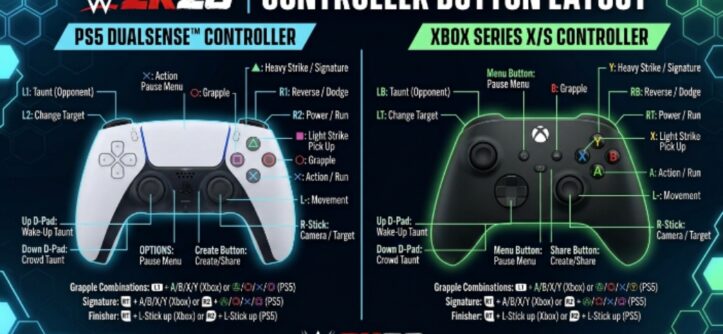
WWE 2K26 dropped on March 13, 2026, and it has already captured the attention of wrestling fans across the United States. Developed by Visual Concepts and published by 2K, this year’s entry features a massive roster of over 400 Superstars and Legends. It also introduces revamped systems that reward smart, strategic play over button mashing.
However, none of that matters if you do not understand the controls. Whether you are brand new to the series or returning after a break, knowing which button does what is the fastest way to start winning. This guide covers everything you need — from basic strikes to signature combos and finishing moves — across PS5, Xbox Series X/S, and PC.
Why the Controls Matter More Than Ever in WWE 2K26
This year, 2K made a significant change to the reversal system. Your stamina bar now directly affects your ability to reverse attacks. If your stamina runs dry, you simply cannot reverse anything. This means aggressive players who throw out moves recklessly will find themselves vulnerable to punishment.
Therefore, understanding every button and knowing when to use it has never been more important. The controls also stayed largely consistent with WWE 2K25, so returning players will feel comfortable quickly. New players, however, need to invest time in learning the layout before jumping into competitive modes like MyFACTION.
Standard Controls: The Core Button Layout
The foundation of WWE 2K26 controls is built around six main categories: Standard, Grapple, Weapons, Carry and Dragging, Manager, and Special Referee. For most players, the first two categories — Standard and Grapple — will take up the majority of match time.
Here is the full standard control layout for PS5 and Xbox Series X/S:
| Action | PS5 Button | Xbox Button |
| Light Strike | Square | X |
| Heavy Strike | X | A |
| Grapple / Lock-Up | Circle | B |
| Irish Whip (in grab) | Circle | B |
| Run | R1 + Direction | RB + Direction |
| Pick Up Opponent | Circle | B |
| Pin | Circle (near downed opponent) | B |
| Taunt | D-Pad | D-Pad |
| Climb Turnbuckle | R1 near corner | RB near corner |
| Signature Move | R2 + Square | RT + X |
| Finisher | R2 + X | RT + A |
| Reversal | Triangle (timed) | Y (timed) |
| Block | L2 | LT |
| Dodge | L2 + Direction | LT + Direction |
| Submission / Minigame | Left Stick | Left Stick |
Strikes and the Combo System
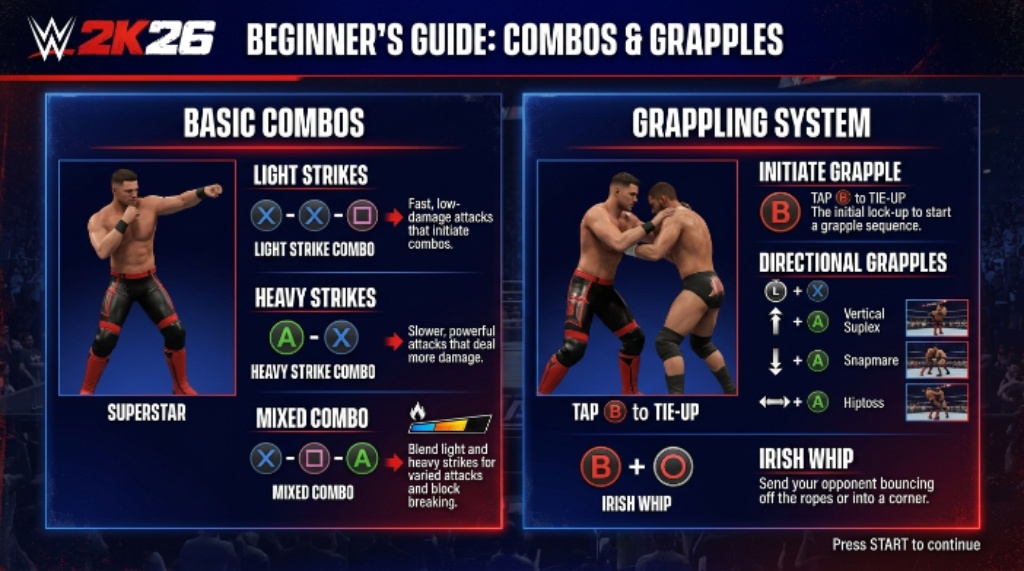
Strikes are the backbone of every match. You throw a Light Strike with Square on PS5 or X on Xbox. Heavy Strikes use X on PS5 or A on Xbox. These two buttons form the building blocks of every combo in the game.
Each Superstar has 30 unique combos available. You build combos by chaining Light and Heavy Strikes together in different sequences. For example, mixing Square, Square, and then X on PS5 creates one specific combo string, while a different pattern produces a completely different attack.
The final hit in any combo is called the Combo Ender. This closing strike deals bonus damage and can also be set as a grapple move. You can customize which moves appear in each combo slot by visiting Create-A-Moveset. Additionally, the in-game Pause Menu shows the full combo list for whatever Superstar you are currently using, so you do not need to memorize everything from the start.
Grapple System: How Lock-Ups and Holds Work
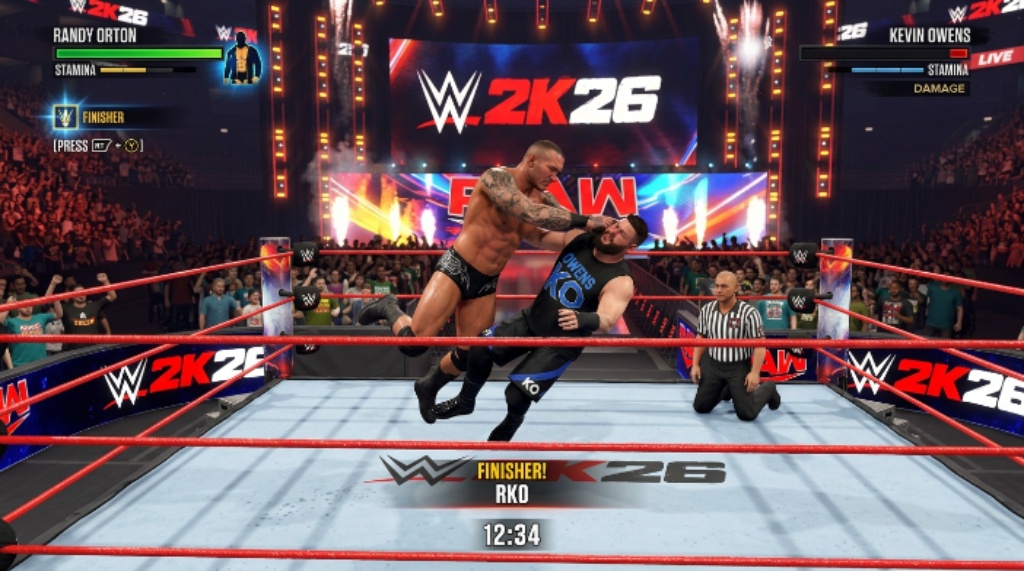
The grapple system in WWE 2K26 follows a two-step process. First, you enter a lock-up state by pressing Circle on PS5 or B on Xbox. Once you are in that grab state, pressing Light or Heavy Strike triggers a grapple move rather than a punch. Pressing Circle or B again inside the grab performs an Irish Whip.
This same logic applies regardless of where you are on the playing field. Ground positions, corner situations, the apron, and the ropes all follow the same entry method. Drag and Carry moves also require the initial lock-up before they can start.
Here is a quick grapple reference:
| Grapple Situation | PS5 Input | Xbox Input |
| Enter Lock-Up | Circle | B |
| Light Grapple Move | Circle, then Square | B, then X |
| Heavy Grapple Move | Circle, then X | B, then A |
| Irish Whip | Circle, then Circle | B, then B |
| Ground Grapple | Circle near downed opponent | B near downed opponent |
| Corner Grapple | Circle near cornered opponent | B near cornered opponent |
| Drag Opponent | L2 + Circle | LT + B |
Reversals and Defensive Options
Reversals in WWE 2K26 are not a single button press. There are five distinct defensive options, and knowing which one to use in each situation makes a real difference.
Here is how each reversal type works:
- Standard Reversal: Tap Triangle on PS5 or Y on Xbox just before your opponent’s attack lands. A reversal icon appears above the Superstar’s head to signal the right timing window. This works against standard strikes, grab attempts, Signature Moves, Finishers, weapon attacks, and diving moves.
- Breakers: These counter strikes that are part of combos and grapples inside the grab state. You press the same button your opponent used. Square or X counters a Light Strike or Light Grapple. X or A counters a Heavy Strike or Heavy Grapple. Circle or B counters a Grapple Combo Ender. Guessing the wrong button locks you out of Breakers for the rest of that combo string.
- Block: Hold L2 on PS5 or LT on Xbox to absorb incoming strikes. Blocking reduces damage taken but does not stop the attack completely.
- Dodge: Press L2 plus a direction on PS5 or LT plus a direction on Xbox to step out of the way. Dodging is riskier than blocking but more rewarding when timed correctly.
- Mid-Move Reversals: Press Triangle or Y when a prompt appears during certain grapple moves. These deal more damage than a standard reversal and are available only for specific hold situations.
Remember, stamina directly limits your ability to reverse. Keep an eye on your stamina bar throughout every match.
Signature Moves and Finishing Moves
Signature Moves and Finishers are the most exciting moments in WWE 2K26. They require you to build Momentum first. Your Momentum gauge fills as you land strikes, grapples, taunts, and successful reversals during a match.
Once the Momentum gauge is full, you can trigger a Signature Move by pressing R2 and Square on PS5, or RT and X on Xbox. Landing a Signature Move immediately earns you one Finisher charge.
You can store up to three Finisher charges at one time. Each stored charge appears as a separate segment in your Finisher gauge on the HUD. To execute a Finisher, press R2 and X on PS5, or RT and A on Xbox.
| Move Type | PS5 Input | Xbox Input |
| Signature Move | R2 + Square | RT + X |
| Finisher | R2 + X | RT + A |
| Catch Finisher (mid-air) | R2 + X (when opponent is airborne) | RT + A (when opponent is airborne) |
| Super Finisher (3 charges) | R2 + X (with 3 stored) | RT + A (with 3 stored) |
Finishers are also position-dependent. Always check your Superstar’s move list ahead of time to understand which positions unlock which finishing variations. A Finisher from the top rope looks and functions differently from one delivered on the mat.
Weapons Controls
Weapons add chaos and drama to any match. WWE 2K26 expanded its weapons roster this year to include thumbtacks and a shopping cart. You can drag opponents into the cart, whip them into it, or use other weapons on them while they are trapped inside.
| Action | PS5 Input | Xbox Input |
| Pick Up Weapon | Circle near weapon | B near weapon |
| Strike with Weapon | Square or X | X or A |
| Throw Weapon at Opponent | Triangle | Y |
| Place Weapon (like table) | Hold Circle | Hold B |
New Features That Change How Controls Feel
WWE 2K26 introduced several gameplay upgrades that affect how controls behave in practice. The physics system received a major update, so Superstars now fall off elevated surfaces more naturally. Interactions with steel steps, tables, ladders, and chairs feel more realistic as a result.
Crowd combat expanded significantly this year. Superstars can now brawl on top of the barricade using strikes and grapples, and barricade dives became a real tactical option. Additionally, stackable tables create new opportunities for dramatic spots in ladder and TLC matches.
The Create-A-Wrestler mode also doubled its slots to 200 characters, and you can upload up to 2,000 images. Grapple locks can now switch mid-hold, transitioning from a wrist hold to an armbar seamlessly. This adds more depth to the ground game and submission sequences.
Tips for Mastering the Controls
Getting comfortable with WWE 2K26 controls takes practice. Here are a few habits that help the fastest:
- Check the Pause Menu during your first few matches to review the combo list for your chosen Superstar
- Prioritize stamina management, since running out leaves you unable to reverse anything
- Practice Breakers in training mode, because guessing wrong locks you out for the rest of a combo string
- Learn your Superstar’s position-specific Finishers so you can trigger them from the most effective spots
- Use taunts strategically to build Momentum without taking unnecessary damage
Conclusion
WWE 2K26 rewards players who invest time in learning its control system. The six control categories — Standard, Grapple, Weapons, Carry and Dragging, Manager, and Special Referee — cover every situation you will encounter in a match. Strikes and combos form the foundation, grapples create opportunities for holds and pins, and the Signature and Finisher system delivers the big moments every wrestling match needs.
The new stamina-linked reversal system adds genuine strategic depth. Therefore, mastering not just the attack buttons but also the defensive options is essential for success. Whether you play on PS5, Xbox Series X/S, or PC, the layout is consistent and learnable with focused practice. Get in the ring, open the Pause Menu, and start working through the combo list — your first championship is closer than you think.
Frequently Asked Questions
What are the Finisher controls in WWE 2K26?
On PS5, press R2 and X to execute a Finisher. On Xbox, press RT and A. You need at least one Finisher charge stored before you can use this input. Charges are earned by landing Signature Moves after filling your Momentum gauge.
How do reversals work in WWE 2K26?
Tap Triangle on PS5 or Y on Xbox just before an opponent’s attack lands to perform a standard reversal. There are also Breakers, Blocks, Dodges, and Mid-Move Reversals for different situations. Your stamina must be above zero to reverse anything.
How do you perform combos in WWE 2K26?
Chain Light Strikes (Square on PS5, X on Xbox) and Heavy Strikes (X on PS5, A on Xbox) together in different sequences. Each Superstar has 30 available combos. Check the Pause Menu mid-match to see the full list for your current Superstar.
What is new about the reversal system in WWE 2K26?
The biggest change is the stamina link. If your stamina bar empties completely, you lose the ability to reverse any attack until it recovers. This forces more careful stamina management and punishes overly aggressive playstyles.
Can you customize controls in WWE 2K26?
You cannot remap the standard button layout, but you can customize which moves are assigned to each combo slot through the Create-A-Moveset feature. This lets you tailor your Superstar’s moveset to match your preferred playstyle.